Thursday, May 28, 2015

Blogging Platorms: Hosted vs Stand Alone in 2015

When it comes to choosing a blogging platform, there are options like Blogger or Wordpress or Typepad. And then there is the decision as to whether you want to host the blog yourself on your own domain, point your domain to a free solution, or some other option. Here is what you should consider when making the choice:

Budget: If you don't want to put any money into your blog, go with a free blog hosted at wordpress.com or blogger.com. The advantage of this is that in the future, you can easily purchase any domain of your choice and point it in the direction of the free blog.

When it comes to costs, there are three main expenses to keep in mind:
  • The blog platform itself
  • Hosting for your blog
  • Domain Name
Technical skill: If you have little or no technical skills in terms of design, purchasing a domain, etc. you'll either need to buy a book, do a lot of research, or hire someone to do it for you. That may also mean something like Blogger is better since it is quite a bit more intuitive than Wordpress. 

Goals: Try to answer the following questions to the best of your ability:
  • Is blogging something I see myself doing long term?
  • What will the main purpose of my blog be?
  • Is my blogging more of a hobby or does it have some professional application?
  • Do I foresee putting ads on my blog?
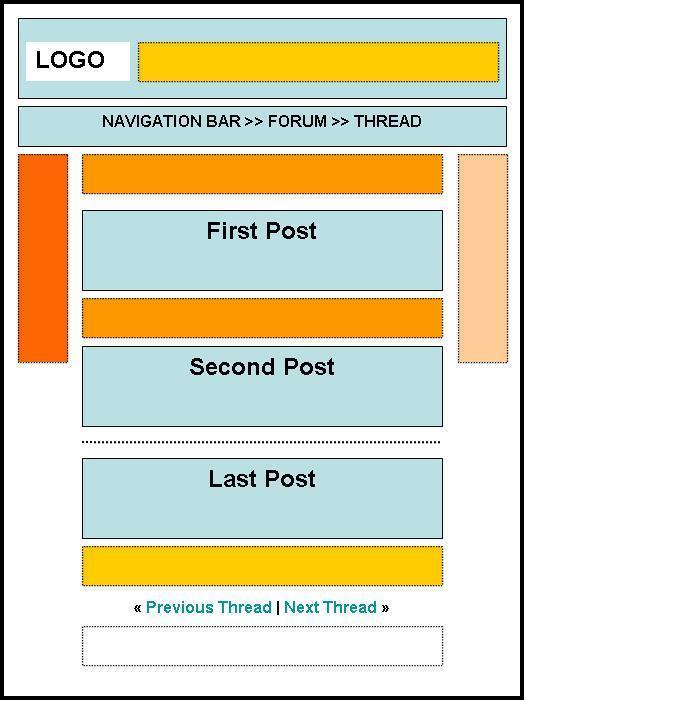


Blogging Platorms: Pros and Cons of Hosted Blogs

Pros and Cons of Hosted Blog Platforms
Pros:
  • Cheap or Free to run – most hosted options are free (of the four I mentioned above, only TypePad charges).
  • Relatively easy to set up – most of these types of blogs can be set up with a basic default template within minutes. The set up is usually just a matter of filling in a few fields with your options and choosing a template design.They are ideal if you know nothing or very little about the technological side of blogging.
  • Simple to Run – Once you’re through the easy set up process hosted blogs are usually pretty simple to run. You will obviously need to learn some basics, but these days most blog platforms come with very user friendly features. Posting is as simple as filling in a few fields and hitting publish.
  • Updated Automatically – if the blog platform updates it will automatically do so for you. Instead of having to upload new software onto a server, these updates happen much more seamlessly.
  • Indexed in Search Engines Quickly – one of the advantages of many hosted blog platforms is that they are put onto domains that have good page ranks already. While your blog won’t be indexed in search engines when you start, most bloggers notice that their blogs get picked up and ranked pretty quickly. In the long run they probably don’t rank much higher than other blogs on stand alone hosting – but they are a quick way to get into SE’s.
Cons:
  • Less Configurable – My first blog was on a Blogger.com blog – the reason I moved from it within months was that it was so limited in terms of features and ability to design a professional running blog. Of course this was 3 years ago and Blogger.com has improved significantly – but one of the biggest frustrations with hosted blog owners are their limited options for customization. This does vary from platform to platform within the hosted options. For example WordPress.com has quite limited design options (for instance you can’t ad ads to templates making it a poor choice to make money with), Blogger.com doesn’t give the option for categories and TypePad has different options depending upon which level you buy in at.
  • Default Design Limitations – While this can be true for standalone blogging systems also I find that many hosted blogs end up looking very similar to one another. This is because the default templates get used over and over again and if you’re a beginner they can be difficult to adapt. For instance with Blogger.com to make changes (and you can make your blog look quite unique) you need to know CSS and HTML to edit your templates (something you need to know with other platforms also it’s worth mentioning).
  • Less Control – Another common complaint I hear regularly from hosted blog owners is that they are frustrated by not having ultimate control over their blog. While they do own the content, the URL is not technically their own and they are somewhat at the mercy of their platform in terms of whether their blog is working or not. For example there have been times in the last few months when TypePad bloggers have been frustrated by their blogs being down for periods of time (something Blogger.com struggles with from time to time also). To be fair on TypePad – they did compensate their bloggers for this down time.
  • Generic URL – having your own URL can give a sense of professionalism and memorability to a blog that hosted options might well go without. While there are some very successful blogs on hosted platforms some bloggers believe that having your own URL is much more professional if you are using your blog in a professional way.
  • Upgrading to Standalone can be Tricky – Probably the question worth asking before you go with a hosted option is what you’ll do if your blog gets big or you get the blogging bug in a way that won’t let you go? One of the issues of starting out with a hosted platform is that if there comes a day when you want to go with a standalone one that you have some work cut out for you in retaining any traffic that you’ve built up. I’m not saying it’s impossible to do (I’ve done it myself) but there are implications of changing domains later in terms of taking regular readers with you, having to climb the search engine rankings all over again and redirecting traffic from one blog to another.

Tuesday, October 28, 2014

Tip #8 - Where to put the ads

You're designing your blog and want to make some money and so you throw some ads up. Now that you have ads on your website, the money will start rolling in, right? WRONG. There are some important things that you have to do in order to maximize the chances of someone clicking on an ad. These actions are based on a report of the top-earning blogs on the internet.

Placement:
  • Engadget places ads before comments but after posts on individual pages for an article, while on the main page, places ads in between each post.
  • Gizmodo places ads between posts on the main page.
  • A blog about Digital Photography puts ads on top of posts, and ads before the comments.
Google has created an image which shows the most clicked areas of a website. I have attached it for your viewing pleasure.


Style:
Look at the ads on this blog. They blend in with the text from my blog. The color of the text of the ad, the background color, and the link color all are the same in the ad as in my blog. That way, you can get accidental clicks and people interested in the ads.

Be sure to NOT ACCIDENTALLY CLICK your own adsense ads. That will probably get your account suspended permanently. Also be sure to read the Terms of Service of AdSense, so you know the do's and dont's to keep your account straight and more importantly, OPEN.

Request Blog

If you would like me to address a certain topic or issue that concerns blogging, just leave me a comment with your question or topic request. Be sure to include your email or subscribe to my Feedblitz service so that you can be notified when I address your question.